

Receive votes
Setup a webhook to receive an universal webhook in your app!
Beginners guide
Before you start
Before starting, you must meet the following prerequisites:
- Followed the tutorial Votes Integration
- Have install NodeJS (tested with 20.10.0 version)
- Have a registered bot on Discord Analytics
- Have installed Git CLI
Configuring your app
In first place, let's download our app sample. Open a terminal and run the following command:
npx wrangler generate my-votes-webhook-app https://github.com/DiscordAnalytics/votes-webhook-exampleThen, go to the folder created by the command:
cd my-votes-webhook-appThis app sample use NodeJS, so we need to install the dependencies:
npm installThen, we need to open the index.js file in a text editor like Visual Studio Code:
code index.jsLocate the following lines and update their values:
const discordWebhook = "https://discord.com/api/webhooks/channelId/webhookToken"
const discordAnalyticsToken = "TOKEN"
INFO
Follow the official Discord article if you don't know how to create a webhook.
Once you have completed this step, you can now deploy your app:
npm run deployLog in to your Cloudflare account, then return to your terminal. Once the deployment is complete, retrieve the URL and open it in your browser to verify that the deployment was successful.
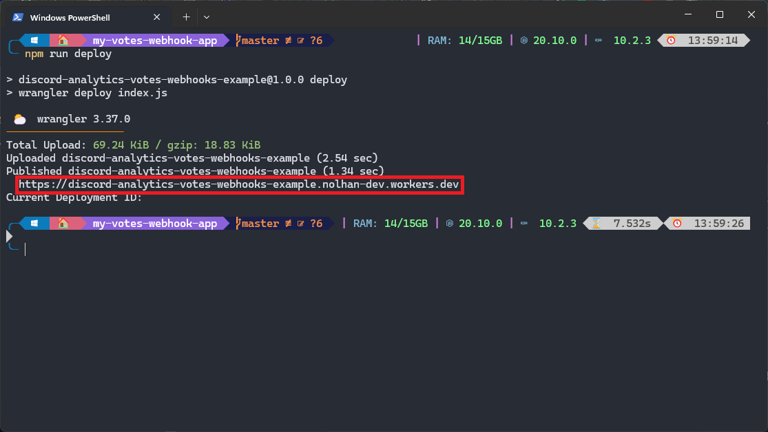
Registering webhook on Discord Analytics
Login to Discord Analytics dashboard, then go to your bot's settings. Scroll to the "Votes Webhook" section

Paste your URL in the field and add /webhook at the end.
INFO
Your URL should look like this: https://<app_name>.<username>.workers.dev/webhook
Now you can save and test your webhook. If everything is correct, you will receive a message in your Discord server. If not, review the steps above.
Webhooks reference
This section of the page is designed for advanced users who want to integrate the Discord Analytics webhook into their application.
How does it work?
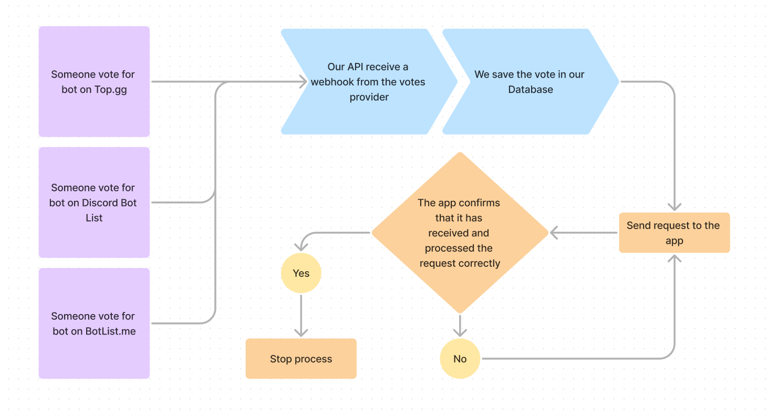
When a user votes for your bot on a bot list, the bot list sends a POST request to the Discord Analytics webhook. Our API save the vote, if you have set up a webhook, it will send a POST request to your app.
Handling a webhook
Firstly, your endpoint must use HTTPS. If you are a beginner, we recommend using Cloudflare tunnels (requires full access to the host machine) or Cloudflare Workers (NodeJS, Rust, C and C++ only). Otherwise, you can set up a reverse proxy with the web server of your choice.
Next, your endpoint must return a 200 status code. Otherwise, the Discord Analytics API will retry the request after 10 seconds (after 15 failed attempts, the request will be discarded).
Aside from these two constraints, you are free to do as you please, respecting our Terms of Service.
Request schema
To verify the origin of a webhook, our API adds your bot's Discord Analytics token to the Authorization header.
Here is a table listing each of the parameters included in the webhook body:
| Property | Value type | Description |
|---|---|---|
bot_id | String | Your bot's ID |
voter_id | String | The voter's ID |
provider | botillon, botlistme, dblist, discordlist, topgg or test | The voting provider |
date | String | The vote date |
raw_data | Object | The data sent by the voting provider |
Example request
{
  "body": {
    "bot_id": "123456789012345678",
    "voter_id": "123456789012345678",
    "provider": "topgg",
    "date": "2021-01-01T00:00:00.000Z",
    "raw_data": {
      // Data sent by the voting provider
    }
  },
  "headers": {
    "Authorization": "YOUR_DISCORD_ANALYTICS_TOKEN"
  }
}